
Mastering Redshift Workload Management (WLM): Best Practices and Pitfalls
Optimizing Redshift WLM: Strategies for Efficiency and Common Mistakes

Amazon Redshift is a powerful data warehouse, but without proper Workload Management (WLM), queries can suffer from long execution times, inefficient resource allocation, and unpredictable performance. WLM allows you to manage query execution, prioritize workloads, and ensure that high-priority queries get the resources they need.
In this article, we’ll explore how to configure WLM effectively, leverage Auto WLM, set up Query Priorities, and use Short Query Acceleration (SQA) for optimized performance.
Understanding Redshift Workload Management (WLM)
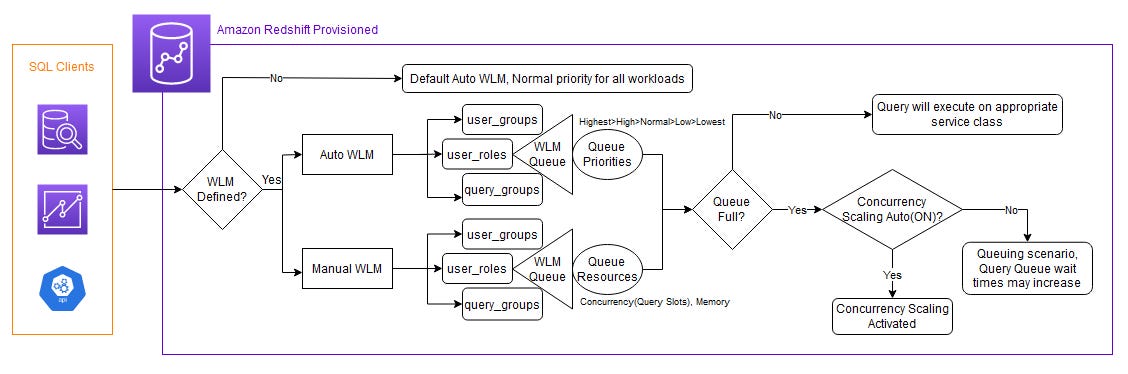
Redshift WLM is responsible for allocating resources to concurrent queries. It helps prevent long-running queries from blocking critical workloads and ensures that system resources are utilized efficiently.
There are two primary types of WLM in Redshift:
Manual WLM – Requires users to define query queues, memory allocations, and concurrency levels manually.
Auto WLM – Uses machine learning to manage resources dynamically, eliminating the need for manual tuning.
Choosing the right WLM strategy depends on your workload characteristics and operational priorities.
Best Practices for Configuring WLM
1. Leverage Auto WLM for Dynamic Resource Allocation
Auto WLM is the recommended approach for most workloads. Instead of manually defining query queues and memory allocations, Auto WLM dynamically adjusts resources based on query demands.
Benefits of Auto WLM:
Automatically optimizes memory and concurrency settings.
Uses machine learning to adjust query execution strategies.
Eliminates the need for complex manual tuning.
How to Enable Auto WLM:
Go to the Redshift console.
Navigate to Workload Management.
Enable Auto WLM for your cluster.
Pro Tip: If you still need some manual control, you can define Query Priorities within Auto WLM.
2. Use Query Priorities to Optimize Performance
Redshift’s Query Priorities feature allows you to prioritize business-critical queries over less important workloads.
Priority Tiers:
Highest – Critical queries that must be executed immediately (e.g., real-time dashboards).
High – Important queries that should be prioritized but can tolerate minor delays.
Normal – Default priority for standard workloads.
Low – Background tasks, batch processing, or non-urgent queries.
How to Assign Query Priorities:
In the Redshift console, go to Workload Management.
Assign queries to different priority tiers based on business needs.
Monitor performance and adjust as needed.
Pro Tip: If your workload has frequent spikes, consider enabling Concurrency Scaling to handle peak loads seamlessly.
3. Enable Short Query Acceleration (SQA) for Fast Query Execution
Short Query Acceleration (SQA) is a Redshift feature that detects short-running queries and routes them to a dedicated queue, preventing them from getting stuck behind long-running jobs.
Benefits of SQA:
Ensures that quick queries (e.g., SELECTs for dashboards) run without delays.
Improves overall system throughput.
Reduces waiting time for lightweight queries.
How to Enable SQA:
Navigate to Workload Management in the Redshift console.
Enable Short Query Acceleration for your cluster.
Monitor and tune based on query performance.
Pro Tip: SQA works best when combined with Query Priorities to ensure real-time analytics queries are handled efficiently.
Common Pitfalls in WLM Configuration
While WLM is powerful, improper configuration can lead to performance bottlenecks. Here are some common mistakes to avoid:
❌ Overcomplicating Manual WLM
Defining too many queues can lead to resource fragmentation.
Poorly allocated memory can starve critical queries.
Instead, use Auto WLM unless you have very specific needs.
❌ Not Updating WLM Settings as Workloads Change
Workload patterns evolve, and static WLM settings may become outdated.
Regularly review query performance and adjust priorities accordingly.
❌ Ignoring Query Monitoring Rules (QMR)
Redshift provides Query Monitoring Rules to detect and handle long-running queries.
Set thresholds for execution time and memory usage to prevent resource exhaustion.
Final Thoughts
Mastering Redshift Workload Management (WLM) is essential for optimizing performance, ensuring efficient resource utilization, and preventing query slowdowns. By leveraging Auto WLM, Query Priorities, and Short Query Acceleration (SQA), you can significantly improve your Redshift cluster’s efficiency.
Start by enabling Auto WLM for dynamic resource management, use Query Priorities to ensure critical workloads run smoothly, and activate SQA to prevent small queries from being delayed. Avoid common pitfalls like overcomplicating manual WLM and neglecting regular performance reviews.
By following these best practices, you can ensure that your Amazon Redshift cluster runs at peak performance, delivering fast and reliable analytics for your business.